Where does the VMware dvSwitch configuration reside?
This question comes up now and again, and usually it’s in the context of backup and recovery. Some of the common responses may include: the vCenter database, the ESX host, or the vCenter server. In my experience, the latter seems to be the most common.
For the purpose of this discussion, when I refer to the vCenter server I am talking about a standalone component that utilizes a vCenter database on a separate server.
Why does it even matter where the configuration is stored? Quite simply, knowing where your dvSwitch configuration resides will help you to understand and refine your backup and recovery strategy - and hopefully let you get a little more sleep at night. Let’s debunk the myths, and figure out where the configuration actually resides.
First, let’s consider some fundamental concepts. The distributed virtual switch is not that dissimilar to a physical network switch. To illustrate, a switch may consist of modules with ethernet ports, a management module, and a configuration file that may reside in flash memory. In a dvSwitch the virtual ethernet modules are distributed across one or more configured ESX hosts, the vCenter server acts as the management or supervisory module, and the configuration resides …
Let’s assert that the configuration for the dvSwitch primarily resides within the vCenter database. As a vSphere administrator, you know that it is absolutely critical (especially in a larger environments) to back up that database, along with other various components. However, if the configuration resides on the vCenter server (like the SSL certificates), then we might need to change our backup and recovery strategy to incorporate this - for fear we lose manageability of our dvSwitches.
Some Basic Similarities Between Physical and Distributed Virtual Switches
| Common | Physical Switch | Virtual Switch |
|---|
| Ethernet Module | Physical module containing ports in chassis | Virtual modules distributed across one or more ESX hosts |
| Management Module | Supervisor module | vCenter Server |
| Configuration File | Configuration residing in memory, and flash or other non-volatile memory | Configuration running on ESX hosts and stored in the vCenter database. |
To validate this assertion, I began by creating a small vSphere environment in my home lab:
It consisted of:
- vCenter Server 5.1 on Windows Server 2012
- MS SQL Server 2008 R2 SP3 on Windows Server 2012
- 2x ESXi 5.1 Hosts
- Active Directory on Windows Server 2012
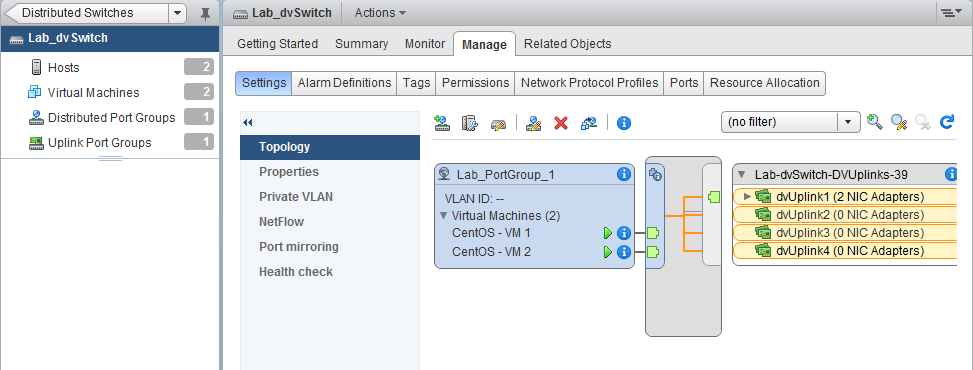
I configured a virtual distributed switch that would be used by both of my ESXi hosts, and added two virtual machines to the lab port group, as pictured below.
 |
| Screen Capture of dvSwitch Topology Before Simulated Loss |
Following this, I backed up - with some trial and error - what I believed to be the most relevant components required to rebuild my vSphere environment. Which components did I backup, and how? I will discuss this in a future article. In the meantime, please note that I did not export the dvSwitch configuration using the vSphere Web Client.
Next, I simulated the loss of my vCenter server by rolling it back to a snapshot before the vCenter server components were installed. I still had the database, so I simply re-installed the vCenter server software (including SSO, Inventory Server, and the Web Client), and configured it to point at the existing database. Voila! As you can see in the picture below, I recovered my lab vCenter server, and I still have the dvSwitch configuration.
 |
| Screen Capture of dvSwitch Topology After Recovery of Environment |
While I believe that parts of the dvSwitch configuration do reside on the ESX hosts, as well as on datastores within the environment, it is my opinion based on my experience that the dvSwitch configuration primarily resides in the vCenter server database.